Teams building and working with agents
Engineers, platform teams, and employees using Claude Code, Codex, Cursor, Windsurf, and whatever comes next. They need to hear that their work keeps moving and that any interruption comes with a reason.
Signals Corps brand book
Logos, color, type, imagery, and language for anyone who builds with the Signals Corps brand: our team, our partners, and the AI agents that write and design with us.

Who we are
Signals Corps helps organizations adopt AI agents with visibility, governance, and control.
We give IT and Security the means to reduce agent risk, so the rest of the business can keep using AI.
Let every team use AI. Keep agent risk under control.
Engineers, platform teams, and employees using Claude Code, Codex, Cursor, Windsurf, and whatever comes next. They need to hear that their work keeps moving and that any interruption comes with a reason.
They need to see what agents are doing, decide what is allowed, and show what happened. They need to hear that they stay in control, with evidence they can defend.
Use these as written. To shorten, drop whole sentences.
Signals Corps gives IT and Security control over the AI agents their teams use.
Give IT and Security the visibility, governance, and control to reduce agent risk from the moment an agent is installed, while it acts, and after an incident.
Signals Corps helps organizations adopt AI agents with visibility, governance, and control. Supply Chain finds every AI agent on employee devices and checks the skills they load. Runtime stops high-risk actions before they execute. Hunt searches AI activity so teams can investigate incidents faster. Together they let every team use AI while IT and Security keep agent risk under control.
Signals Corps is a Do Only Good Everyday Security Company
The platform
An agent can create risk from the moment it is installed, while it acts, and after the activity is logged.
Signals Corps Control Plane is the platform, and Supply Chain, Runtime, and Hunt are its modules. Each module owns one moment and one color. They always appear in this order.
Find every AI agent on every device. Check every skill it loads.
The Signals Corps Endpoint Agent audits every device for Claude Code, Codex, Cursor, Windsurf, and other agents and the skills, plugins, and MCP servers they can load, then checks every skill on the device.
Control risky agent actions. Before they execute.
Evaluate tool calls, shell commands, file access, and network activity in the flow of work, then allow, warn, request approval, or block.
Find the signal in your AI logs. Follow every action.
Search agent sessions, tool calls, policy decisions, and logs from agents, gateways, and model providers to reconstruct incidents and investigate suspicious behavior.
Logo
The logo is a sonar mark and the Signals Corps wordmark, both on the same lime plaque with an ink outline and a hard ink shadow.
Sharing the plaque is what makes them one family. Every file has outlined lettering, so none needs fonts installed.




Sites and apps other than signalscorps.com name themselves next to the plaque lockup: a 2px ink rule, then the site or module name in the wordmark face at the wordmark's size. Inside Control Plane the label follows where you are: Control Plane at platform and settings level, the module name inside a module. The main site has no label.
Brand kitbrandkit.signalscorps.com
DocsThe docs portal
SupportThe support portal
Control PlaneSignals Corps Control Plane at platform and settings level
HuntInside a module in Control Plane: Supply Chain, Runtime, or Hunt
The plaque carries its own background, so the logo works on canvas, paper, blue, and ink. On ink the shadow disappears into the background, which is expected.
CanvasPaperBlueInkRecolor the plaque or the rings
Stretch or squash it
Rotate it
Add a soft shadow or effects
Put the glyph on another fill
Module icons
Each icon sits on its module's color plaque, and the platform icon sits on blue.
They borrow from the sonar mark: the open ring, the center point, the same stroke weight. Use them to label a module or the platform wherever its name appears in navigation, docs, decks, or Control Plane.


Favicons use the sonar mark itself, recolored to the module so a browser tab shows where you are. The home page and anything not tied to one module keep the lime mark. Platform pages and Control Plane use lime, like the logo. Module pages use their module color, the blog uses orange, this brand kit uses purple, the Trust Center uses powder, the status page uses bronze, the docs portal uses teal, switching to the module color inside each module's docs, and the support portal uses olive, the color of the Captain's uniform. This is the only place the mark appears off lime.
Signals Corps Platform | Signals Corps
 Get started | Signals Corps docs
 Support | Signals Corps
 Supply Chain | Signals Corps
 Runtime | Signals Corps
 Hunt | Signals Corps
 Blog | Signals Corps
 Brand kit | Signals Corps
 Terms of Service · Signals Corps Trust Center
 Signals Corps Status
 Platform
 Supply Chain
 Runtime
 Hunt


An icon labels a module or the platform. Show that name next to it unless the name is already on screen, and give it alt text with the name.
Each plaque uses its module's color: blue for the platform, yellow for Supply Chain, sky for Runtime, soft pink for Hunt. The platform glyph is white for contrast on blue.
Below 32px, use the flat version without the offset shadow. Don't go below 16px.
Use the glyph-only version in ink where color isn't available, such as monochrome docs or toolbars. Never recolor it.
Module icons never stand in for the Signals Corps logo, and lime stays reserved for the logo plaque.
When the icons appear together, show them as Platform, then Supply Chain, Runtime, and Hunt.
The Captain
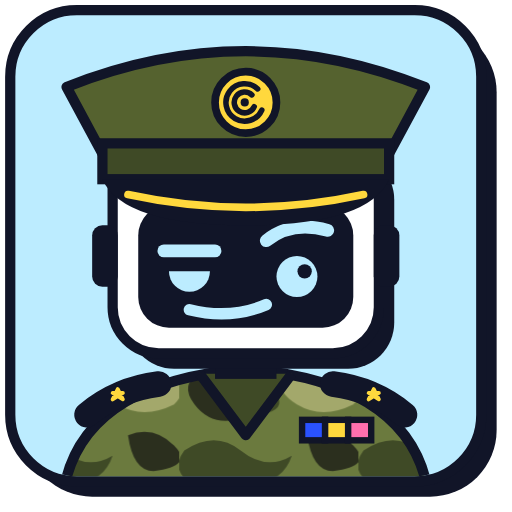
The Captain is the face of the Signals Corps AI support agent: a robot officer of the corps.
Intelligent, serious about the work, and dryly funny, the Captain gets you the right answer first and saves the raised eyebrow for the misconfiguration.

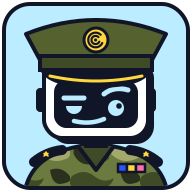
The support agent is software, and the design says so plainly. Sky is the Runtime color, for an agent that answers while you work.
Gold braid on the peak and a gold cap badge carrying the sonar glyph, which ties the character to the mark.
Olive camo fatigues, shoulder boards with officer's pips, and a ribbon bar in blue, yellow, and pink.
One eye half-lidded, one brow raised, a lopsided smirk. It reads as sharp and dryly amused, and never as angry or mocking.
The Captain speaks in the Signals Corps voice with the wit turned up. The answer always comes first, with one dry line at most around it. It can be unimpressed by an expired token, never by the person asking. Light military flavor such as rank and orders is fine; combat language stays out. During incidents, security events, data loss, billing, or when someone is stressed, the jokes stop and the Captain is calm, brief, and exact.
| Situation | The Captain |
|---|---|
| Greeting | "Captain here. Tell me what's broken and I'll tell you how we fix it." |
| A blocked command | "Not on my watch. Runtime blocked rm -rf ./build at 14:02 under your destructive-commands policy. If the command is intended, an admin can approve a one-time exception in Policies." |
| A simple misconfiguration | "Your scan failed because the registry token expired yesterday. A bold strategy. Add a new token under Settings, Integrations, then run the scan again." |
| An active incident | "Understood. Hunt shows 14 sessions from that agent since 09:10. Open the timeline in Hunt, filter by the agent ID, and I'll walk through each high-risk action with you." |
| Something it can't do | "That's outside my orders. I can't change billing details, but your account admin can under Settings, Billing." |
Don't redraw, recolor, re-pose, or add props, and keep the character on its sky plaque. New expressions and poses are added to the brand kit so every tool shares one set.
The Captain appears where the support agent speaks. It never stands in for the Signals Corps logo or a module icon.
Field dark, sage, bark, and cap exist only inside the character. Olive is the one exception: it also marks the support portal's favicon, where the Captain works.
Imagery and meaning
Signals Corps listens for what agents are doing and turns it into something IT and Security can act on.
The visual language carries that idea from the mark to the page.
1
2
3
The thing being observed: an agent, a session, a single action.
A sonar ping spreading outward, the way coverage reaches the three moments of risk: before trust, while agents act, and after activity.
The rings never close into a wall. We watch and control without fencing teams in.
A ping goes out, meets something, and comes back as a signal you can act on. That is the job.
A label stamped on a piece of kit: high visibility and impossible to mistake. Lime is reserved for the brand, so seeing it means Signals Corps.
Solid offsets with no blur make components feel like objects with clear edges, which suits a product built on clear decisions and evidence you can point to. Pressing a control removes its shadow.
The mark at page scale, as if the ping from the logo is still traveling. Faint, decorative, tucked into the top corner. Text never crosses them.
Yellow for inspection before trust, sky for live activity, soft pink for investigation afterwards. Blue holds the platform that connects them.
Recreated product UI in ink-outlined windows: device inventories, blocked commands, Hunt timelines. Invented data is always labeled "Illustrative data".
Photography is for real people, such as blog authors: circular crop, ink outline, small hard shadow. No hooded hackers, padlocks, glowing shields, or binary rain.
Color
Repeat a color only when the repetition means something: the same module, state, or category.
Never cycle colors across unrelated cards for decoration. Each blog team has its own post color that no other team or role uses: mint for Platform Engineering, coral for Threat Research, lilac for Marketing, sand for Sales Engineering, slate for Legal. Team plaques stay white, never the team color. Every blog series shares one label color, aqua, which is separate from the team colors: a series post shows an aqua series kicker above its title everywhere it appears, from the post header and post cards to the site menu, banners, and social cards. Diagrams have their own palette (periwinkle, cream, orchid, sage, and peach) and never borrow a brand, module, team, or blog color. Heat maps and other amounts step through the four scale colors, from light to dark petrol. Select a swatch to copy its hex value.
Typography
Manrope carries almost everything, from 800-weight headlines with tight tracking to body copy.
DM Mono is only for genuinely technical content. Space Grotesk Bold is reserved for the wordmark and the site or module label beside it.
letter-spacing: -0.058em; line-height: 1Stop high-risk actions. Before they execute.
letter-spacing: 0.08emWorks with your agent stack
line-height: 1.65; about 65 charactersApply the right control through one endpoint agent, native hooks, MCP, extensions, and gateways without forcing teams onto one tool.
code, commands, paths, timestamps, log dataletter-spacing: -0.045emSignals Corps
Shape and components
Solid ink outlines, modest corner radii, and hard offset shadows.
Interactive elements move toward their shadow on hover and lose it when pressed. Try the buttons.
Solid fill, ink outline, ink shadow, 800-weight label. Hover turns yellow. Focus is a pink ring. No pill shapes for text.
Classification and status labels use a 7px rectangle. Circles are only for dots, avatars, and sequence markers.
Voice and language
We write for builders and for IT and Security at the same time.
Security is how an organization says yes to agents with confidence, so we never use it as a reason to slow down or stop.
"Stop high-risk actions before they execute" comes before "a hook evaluates each tool call".
Name the control point, evidence, or workflow once the reader knows what it protects.
A user, a risk, an action, or an outcome. Verify, control, investigate, stop, approve, reconstruct.
State what a check covers and what evidence it rests on. "Browser results are an advisory preview" is on-brand.
Direct verbs, plain words. Cut anything that does not change the meaning.
Specific and practical. We never scold the reader or sell with fear.
Two short sentences. A lead that states the benefit, then an accent in a contrasting color that adds timing or proof.
Let every team use AI. Keep agent risk under control.
Find every AI agent on every device. Check every skill it loads.
Find the signal in your AI logs. Follow every action.
| Use | Avoid |
|---|---|
| Signals Corps | Signals, Signal Corps, SignalsCorps, SC |
| Supply Chain, always | Supply Chain Security, SCS, supply-chain |
| Runtime | Runtime Protection, RTP, runtime guard |
| Hunt | Signals Hunt, the Hunt product |
| Module: the Supply Chain module, Control Plane modules | product, app, tool, feature, solution, add-on |
| Signals Corps Control Plane, then Control Plane | the Signals Corps app, the app, the dashboard, the console, the suite, the solution |
| AI agents, then agents | bots |
Signals Corps Control Plane is the platform. It hosts the modules: Supply Chain, Runtime, and Hunt. It lives at controlplane.signalscorps.com and opens to early sign ups in the next few weeks. Until then, link calls to action to the early access waitlist. Write "Signals Corps Control Plane" on first mention and "Control Plane" after that. Never call it "the Signals Corps app", "the app", "the dashboard", or "the console". Supply Chain, Runtime, and Hunt are always called modules ("the Supply Chain module", "Control Plane modules"), never products, apps, tools, features, solutions, or add-ons. When the relationship matters, describe a module as part of Control Plane: "Hunt, in Signals Corps Control Plane, searches agent sessions and tool calls."
How a Signals Corps sentence is built, for everything we write: website pages, docs, blog posts, emails, decks, social posts, and support replies. Write this way from the first draft.
Say what changes for them, then how it works.
Runtime stops a risky command before it runs. Then: a hook sends the command to the policy engine.
Add the detail that makes it ours: the file, command, rule, or event.
Runtime stopped curl -T .env to an unapproved domain and showed the developer the rule that matched.
Commands, paths, config keys, rule IDs, and log lines go in code formatting so readers can copy them.
The first time a page says "MCP server" or "tool poisoning", explain it in plain words. Then use the same term every time.
On every page and in every format: name what was tested and the version, whether a claim comes from observed behavior, synthetic examples, or documentation, and where the check stops.
No binary or version inspected.
Name the risk and its consequence, then what to do. Keep "must" and "never" for real requirements, with the reason. No scolding.
Organization, behavior, analyze, color, center, catalog, program.
Headings, labels, and buttons. Buttons start with a verb: "Get early access".
No em or en dashes. Use a comma, colon, parentheses, or a full stop. Straight quotes and the Oxford comma.
Bold only what readers must not miss. No bold label on every list item, and no emojis or arrows in headings.
Words that usually mean generated text: delve, crucial, pivotal, robust, landscape, showcase, underscore, foster, testament, vibrant, seamless, next-generation, game-changing, unlock, empower. Use the plain word. Mockups and dashboards with invented numbers carry the label "Illustrative data".
For agents
The brand kit ships as a Claude Code plugin with three skills.
Agents load them automatically when they write copy, draft a social post, or design anything with the Signals Corps name on it.
The voice skill covers positioning, approved descriptions, naming, vocabulary, how the Captain talks, and a review checklist. The social skill writes posts built to spread (a hook from our own research, a short shape, and numbers that match the source) and dry, industry-aware memes. The visual skill covers logo choice, module icons and favicons, color roles, type, shape, the Captain, and what the imagery means. All three are rebuilt from the brand kit's guidelines on every release, so they match this book.
skills/signals-corps-voice/How Signals Corps talks about itselfskills/signals-corps-social/How Signals Corps writes social postsskills/signals-corps-visual/How Signals Corps looksdist/tokens.jsonMachine-readable color, type, radius, and shadow valuesdist/brand.jsonAsset manifest with paths, uses, and minimum sizes# Add the brand kit as a plugin marketplace /plugin marketplace add signalscorps/brand-kit # Install the brand skills /plugin install signals-corps-brand@signalscorps-brand-kit
Needs read access to the signalscorps/brand-kit repository on GitHub. Restart Claude Code after installing.